Missing value analysis using SPSS is a procedure of finding, replacing or coding missing values of a data set using SPSS. SPSS is a simple statistical analytics tool which help us to perform various data analytics task.
Missing values analysis using SPSS
How can we find missing values?
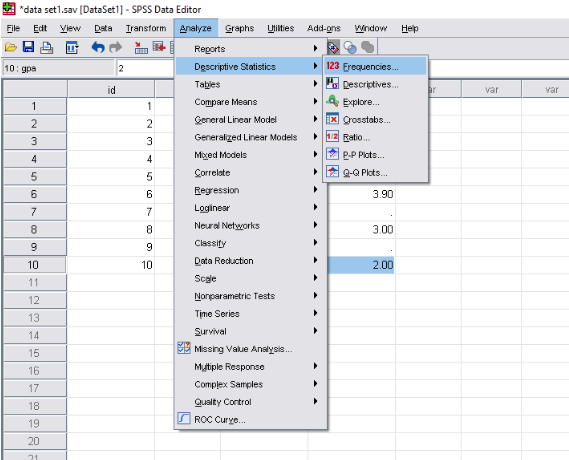
- To find the missing values we have to go “Menu bar” and click on ,
“Analyze”→”Descriptive statistics”→”Frequencies”
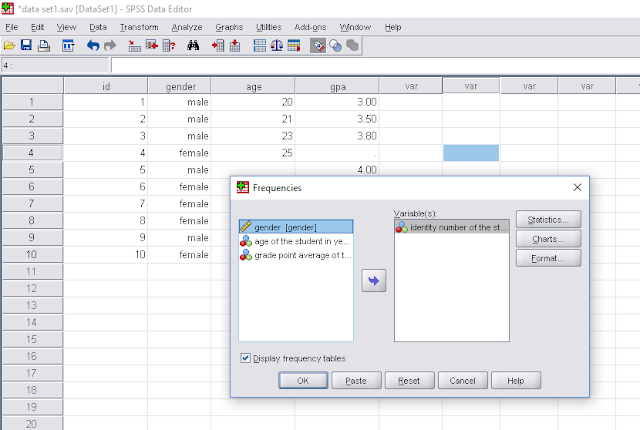
Then there open a new box named “Frequencies” , now we have to double click on the every variable and click on “ok”.
| Finding missing values |
↓
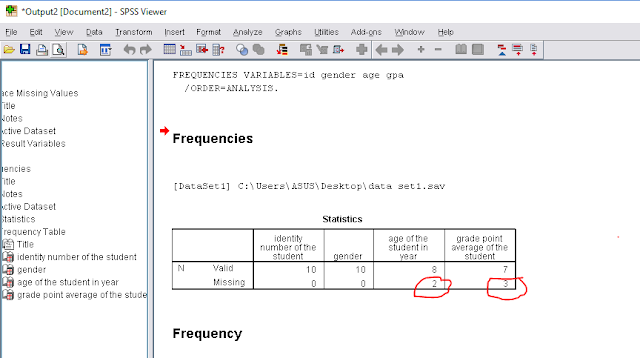
3. Now we can see the output window with frequencies of the variables.
If we have any missing value , we can see the number of missing in “missing sector”
| Finding missing values |
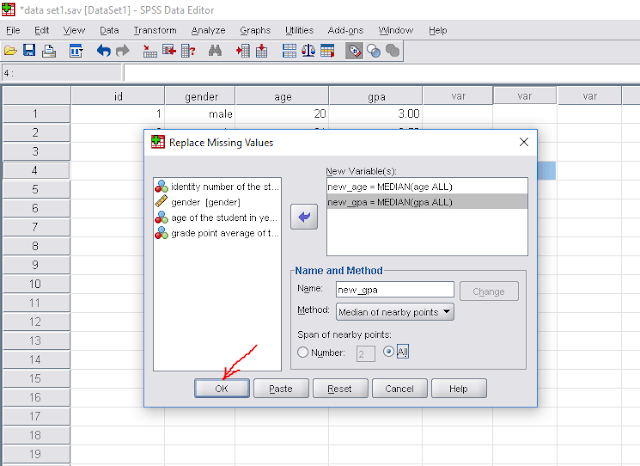
4. Now we have to replace the missing values. For replacing the missing values we have go to “Menu bar” and click on “Transform”→”Replace missing values”, then there open a new box named “Replace missing values” and double click on the variable which contains missing value. for example
“age of the students in year” and “grade point average of the student”,
5. Then we have to enter a new variable name for each variable(which contains missing value) in the “name” section and go to “method” section and select “median” and click on “change”
And finally click on “ok”
| Replacing missing values |

↓
| Replacing missing values |

6. Finally new variable creates and there is no missing values left.
| Replacing missing values |

By using this process we can easily replace missing values for any length of data set.
There is also an alternative way to find missing values.
Alternative way to find missing values in a data set:
1. First we have to go to the Analyze section and click on it, then we have to follow the following instruction as in the images.
| Go to analyze |

| Select missing value analysis |

| Select all the variables |
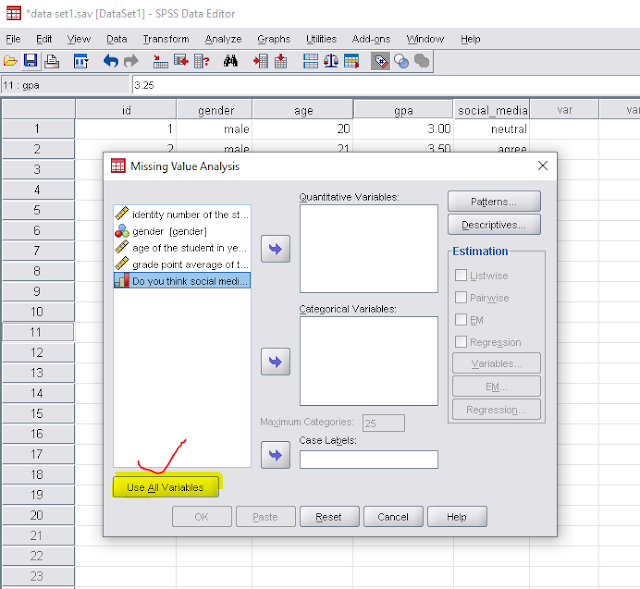
| click on “ok” |

Missing value analysis using SPSS (result)
| Output window |

Finally, we can see there exit two missing values in two variable. Now we have to follow the instruction (discuss in the first section) to code/replace the missing values.
Try some new contents about data analysis and statistics:
- Time series analysis
- Business forecasting
- Hypothesis testing
- Logistic Regression
- Inference
- Experimental Design
- Correlation Analysis
- Data analysis using spss
- Data analysis using SPSS
- Data entry in SPSS
- Import data in SPSS from excel file
- Sort data in SPSS
- Merge data set in SPSS
- Finding, Replacing and Coding missing values in SPSS
- Variable transformation, Recoding variables in spss
- Bivariate analysis in spss
- Normality check in spss